

Using Webhooks
Overview
Ocus allows clients to register webhooks to receive real-time notifications about events occurring within the system. By registering a webhook, your application can automatically process updates as they happen.
Configuring a webhook
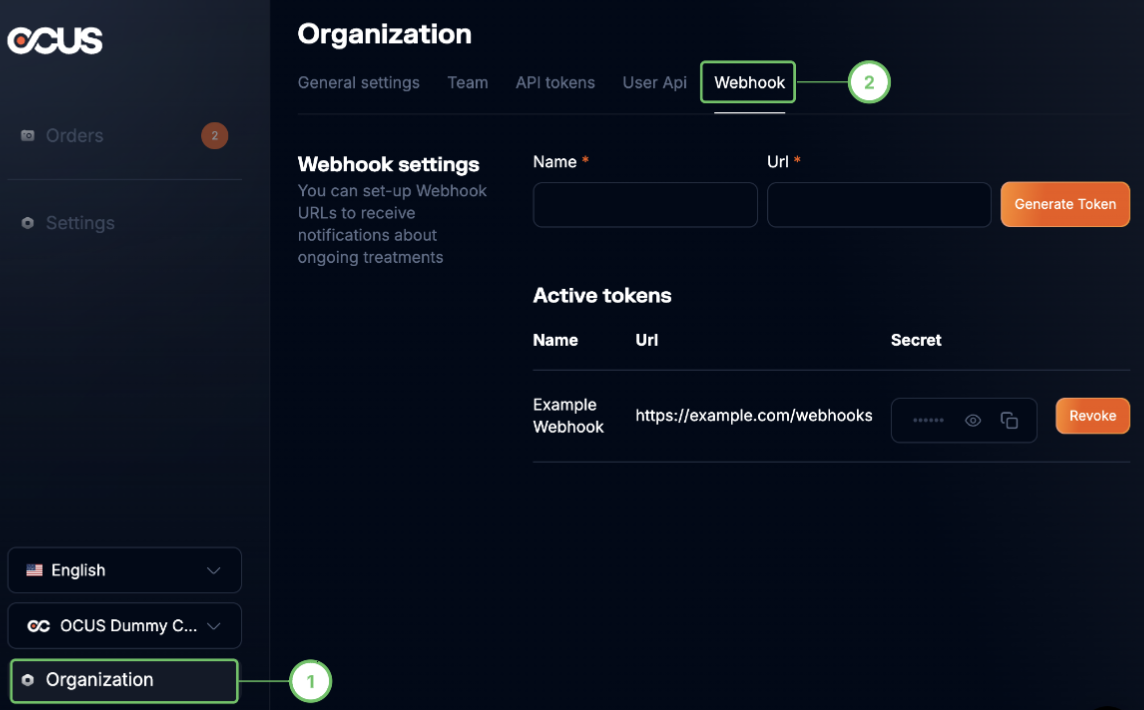
You can register webhooks from your Organization settings.
When registering a webhook, you must provide the following details:
- URL: The endpoint where webhook events should be sent.
- Name: A descriptive name for the webhook to help identify it.
After clicking "Generate Token", you will be provided a secret key used for the signature verification.
Once your webhook is set up, you will receive notifications about all events for your organization.
It is not possible to choose which status updates you will and won't receive. We recommend that you create a filter on the webhooks, track every notification you receive, and then decide which notifications require your attention.
{
  "type":"event",
  "id":"project.updated",
  "attributes":{
    "organization_id":"4b89fb76-ff31-11ea-97b3-06cd5087dcc2",
    "project_id":"98b42f9c-9780-11eb-b9cc-7e0487d3216d"
  }
}
Possible values
The type field can take the following values.
| Event | Explanation |
|---|---|
project.updated | The project was updated (all updates, including required actions) |
project.status.updated | The status of a project has changed. |
The attributes field can contain the following attributes.
| Attribute | Explanation |
|---|---|
organization_id | The ID for your organization, which is especially relevant if your instance of the OCUS API has multiple organizations. |
project_id | Unique ID for the project. |
status | Status of the project. Possible values: "not_assigned", "assigned" "waiting_for_visuals", "pending_validation", "completed", "canceled", "archived". |
Event payload examples
project.status.updated
{
  "type":"event",
  "id":"project.status.updated",
  "attributes":{
    "organization_id":"4b89fb76-ff31-11ea-97b3-06cd5087dcc2",
    "project_id":"98b42f9c-9780-11eb-b9cc-7e0487d3216d",
    "status": "completed"
  }
}
project.updated
{
  "type":"event",
  "id":"project.updated",
  "attributes":{
    "organization_id":"4b89fb76-ff31-11ea-97b3-06cd5087dcc2",
    "project_id":"98b42f9c-9780-11eb-b9cc-7e0487d3216d"
  }
}
Security Considerations
- Keep the Secret secure: The secret key should never be shared or exposed publicly.
- Validate incoming webhooks: Use the provided secret to verify webhook signatures and ensure they originate from OCUS.
- Use HTTPS endpoints: Ensure your webhook URL is secured with HTTPS to protect data in transit.
Reliability considerations
- Retry policy: In case the endpoint you provided is not up-and-running (non-2xx status code), OCUS has implemented an exponential backoff retry policy. It will perform multiple retries for at least 6 hours.
- Events ordering: OCUS doesn’t guarantee the delivery of events in the order that they’re generated. Depending on your implementation, this may or may not have consequences. You can always use the API to make sure the data you get from the event is up-to-date.
By following these steps, you can successfully integrate with OCUS webhooks and process real-time event notifications in a secure and reliable manner.
Updated 12 months ago